Monday, January 12, 2009
The Macs are back with Jack, Cloey in 24
Cloey is working on Mac laptop while trying to orchestrate Jack's way out of the building with Tony. Cloey is using 9 different screens on the Mac to watch what is going on in all the rooms, corridors etc.


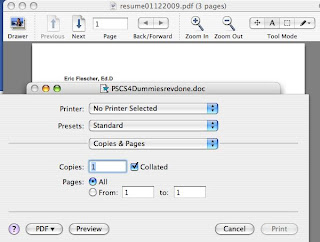
Converting resumes and other files to pdf etc.
\
It is that time of the year when resumes are being created, printed and readied for jobs and employment. Many employers today want/need your resume, references, applications, letters of support, transcripts and other papers, your resume(s) uploaded to the place of work or institution, usually in either word or pdf format. You could go to duplication business or place but why not do it on your computer. I found several ways.
(1) You can use a scanner to convert your files.
(2) To find some free converter, use google and type in free pdf converters. I found this one.
http://www.freepdfconvert.com/It worked well but if you have big files, the pdf file has to be loaded to the desktop through the downloading of zip file. For some reason also, one has to wait 30 minutes to do it again. So I looked for another source in Appleworks and OSX (Leopard or before) .
(3) For OSX, find your document in Word, text, format. Click on it and then under FILE> PRINT check the PDF format (see above to the left). Save the file to the desktop or your hard drive etc.
(4) Another way is to first open your document in Textedit by clicking and then hit click Open Apple-O. The document will expand in Textedit for format and a window opens up.
(5) Appleworks - open your document, then instead of saving, click on print. Click on pdf format and save where you want in pdf format.
Either way then upload your files. One of these ways might save you some time and money. Happy job hunting and finding!

It is that time of the year when resumes are being created, printed and readied for jobs and employment. Many employers today want/need your resume, references, applications, letters of support, transcripts and other papers, your resume(s) uploaded to the place of work or institution, usually in either word or pdf format. You could go to duplication business or place but why not do it on your computer. I found several ways.
(1) You can use a scanner to convert your files.
(2) To find some free converter, use google and type in free pdf converters. I found this one.
http://www.freepdfconvert.com/It worked well but if you have big files, the pdf file has to be loaded to the desktop through the downloading of zip file. For some reason also, one has to wait 30 minutes to do it again. So I looked for another source in Appleworks and OSX (Leopard or before) .
(3) For OSX, find your document in Word, text, format. Click on it and then under FILE> PRINT check the PDF format (see above to the left). Save the file to the desktop or your hard drive etc.
(4) Another way is to first open your document in Textedit by clicking and then hit click Open Apple-O. The document will expand in Textedit for format and a window opens up.
(5) Appleworks - open your document, then instead of saving, click on print. Click on pdf format and save where you want in pdf format.
Either way then upload your files. One of these ways might save you some time and money. Happy job hunting and finding!
and expensive iPhone
And I thought the iPhones were expensive. This one really is
http://www.buymeaniphone.com/2009/01/11/most-expensive-phone-ever-made/
http://www.buymeaniphone.com/2009/01/11/most-expensive-phone-ever-made/
Planetarium on your iPhone or Mac

I have been using Starry Night software for quite a number of years to help me track and photograph comets and much more. Now the company has a cool free dashboard widget which you can upload to you iPhone or Mac. With it you can view the sky that night and more.
Download it and try it.
Dreaded spinning beach ball slowing you down- here's w

Your Macintosh is operating but all of a suddenly the dreaded Spinning Beachball appears. Waiting, waiting and waiting is maddening and wastes a lot of your time. Want to see what is going on?
(1) Go into the activity monitor (follow this hierachy)
HD>Applications>Utilities>activity monitor
(2) You will see this view of the activity monitor (left)
(3) Look at all the applications etc that feed on your ram, CPU power and morecheck out the real memory
(4) what is cool is that if you have the activity monitor in an open window, you can actually see how the numbers % are changing.
(5) find the one that has the highest percentage and either turn it off if needed or delete and do that for others.
(6) For example, if you have too many widgets (HD>Applications>Utilities>Dashboard) you might be using to much memory at certain times which slows down your Macintosh. I found that when the Clock's Widget that I had installed on my computer's Dasboard would display run quite often to update the time, it robbed my cpu of a good % power. And since it updates very often, it would rob power, unbeknowst to me, frequently. (I turned it off by taking it out of the Widget display area, thus saving memory and cutting down on the dreaded beach ball time. This is what I did.
(7) Open the Widgets display on the Desktop, inside the Dashboard Widget area.
(8) Click on the "+" on the bottom Left hand corner. There is a row of the Widgets on the bottom.
(9) There is a little "x" on the top corner of each Widget. Clicking on the "X" , the Widget will disappear from the desktop. Turned "off", the CPU won't rob power all the time or frequently from the CPU.
(10) You can always import, delete and find more Widgets. But for now speed up your CPU by not robbing it of memory so that the spinning dreaded beachball will go away or at least not hang around so long.
Comments, suggestions, ideas welcome
Friday, January 9, 2009
Macintosh in Telescope/ Observatory
I opened up my MacLife issue 2/2009 and found a nice article P.50-52) "In a galaxy far, far away" by Leslie Ayers. It's about David Illig of Maryland and his very nice observatory and telescope system. His four macintosh computers, Canon 50D, two telescopes help his digital imaging and deep sky endeavors. He used Equinox software (never heard of this one) and Starry Night Pro (which I love). Very in depth and nicely written with photos.
I can't find the article online but you can take a look at it in bookstores with the MacLife magazine
Dr. Eric Flescher (kcstarguy@aol.com), Olathe, KS: Lat 38.834, Lon -94.778
I can't find the article online but you can take a look at it in bookstores with the MacLife magazine
Dr. Eric Flescher (kcstarguy@aol.com), Olathe, KS: Lat 38.834, Lon -94.778
Is Vista finished?
First there are TV commercials from ordinary people (apparently people who have never seen a panorama, graphic or color) who extoll how Vista is so great. Now the latest report is the Windows 7 is coming out in beta and you can get a download and test it out.
Subscribe to:
Posts (Atom)

 Posts
Posts